How Customers Can Order Your POD Product
PrintLink: Customers access the product or series landing page by following the PrintLink you have shared, embedded or printed. They can order the specific linked product by clicking the ‘Buy Now’ button, which takes them straight to checkout. Alternatively, they can click the ‘Add to Cart’ button to continue browsing and add other items from the publisher's landing page or series carousel before proceeding to checkout.
Customer communication:
- The customers adds products to their cart
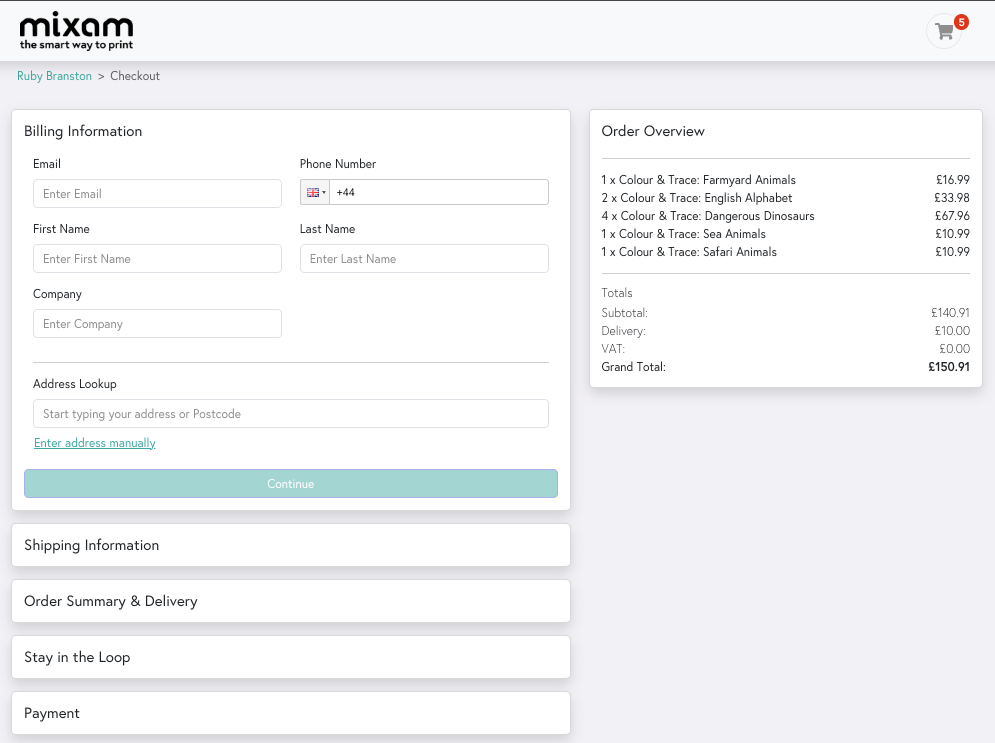
- At checkout, they complete their billing and delivery details, select a delivery service and choose whether to opt in to marketing from the publisher before completing their card payment.
- The customer receives an order confirmation email with an order summary, order number and their invoice from Mixam
- The customer receives an order dispatch email with tracking details once the product has left the production facility. If tracking details are not received within 7 working days, customers should contact our team for assistance. Please note that response times may be longer during peak seasons.
- The customer receives one or multiple high-quality printed copies of your product to their address based on the details they stated at the checkout.
*Note
- Mixam order confirmation emails may be found in spam or junk folders depending on the customers email settings.
- Emails are always sent to your customer and cannot be turned off.
- Emails are Mixam-branded and do not reflect branding or customisation you have selected for your publisher landing page.
- When a customer purchases your PrintLink product, you can opt in or out to receive an email notification. This setting can be updated in Publishing Hub > Publisher Profile > Update preferences.
Shopify
- Customers can access the Shopify Store or product-specific page through a URL, which may be via an embedded link, QR code, or website redirection.
- They can add multiple items to their cart, products could be offered from multiple fulfilment Apps.
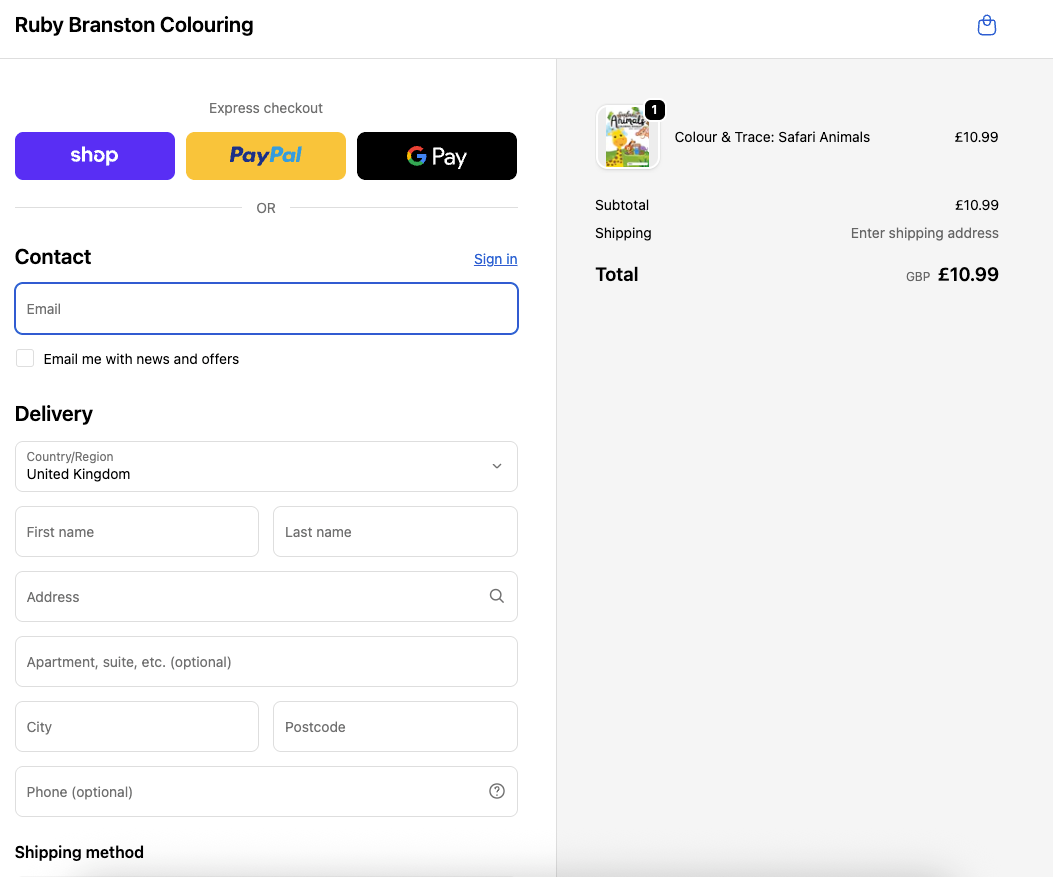
- They complete their billing and delivery address and select from one of the supported payment methods you choose to present at your store checkout.
- An order confirmation email is sent to them from your Shopify store.
- Manual or automatic fulfilment triggers a fulfilment request to Mixam, resulting in order creation, publisher payment, and production.
- Customer receives an order dispatched email from your Shopify store.
Payment
PrintLink
Customers can buy your POD products from the Mixam-hosted checkout using any debit or credit card.
Shopify
Customers can buy your POD products from your Shopify store checkout using a wider range of payment methods such as: Google Pay, PayPal, ShopPay, credit or debit cards, Klarna, ApplePay, bank deposit, money order etc, depending on the store settings and payment option you have set up.
Shipping
Selling via PrintLink
|
PrintLink Setup Country |
Regional Shipping |
International Shipping |
| US | ✔ | ✔ |
| UK | ✔ | ✔ |
| Australia | ✔ | Coming Soon |
| Germany | ✔ + Netherlands | Coming Soon |
| Canada | ✔ + USA | Coming Soon |
| Japan | Coming Soon | Coming Soon |
Selling via Shopify
|
PrintLink Setup Country |
Regional Shipping |
International Shipping |
| US | ✔ USPS (fixed cost $5.00) | ✔ |
| UK | ✔ Royal Mail 48hr Tracked, (fixed cost £3.50) | ✔ |
| Australia | Coming Soon | Coming Soon |
| Germany | Coming Soon | Coming Soon |
| Canada | Coming Soon | Coming Soon |
| Japan | Coming Soon | Coming Soon |
Fees & Taxes
When selling into the USA or Canada via:
PrintLink
There is a single sales transaction between Mixam and your customer. The Mixam checkout calculates taxes based on the product, delivery address, and chosen delivery method. Your customer pays the tax directly.
Shopify
There are two sales transactions, your customer buys from you and you buy from Mixam. You may have your Shopify store settings configured to collect tax from your customer at checkout. However, Mixam will charge you, the publisher, for tax which is based on the customer's delivery address and calculated only when Mixam receives the fulfilment request. This is due to the nature of reselling.
Publisher tax payments can be avoided by submitting a Tax Exemption Certificate. Once verified, we'll update your account and subsequent orders with delivery addresses to the States you are exempt in will be tax-free until the certificate expires.
How to upload Tax Exemption Certificate:
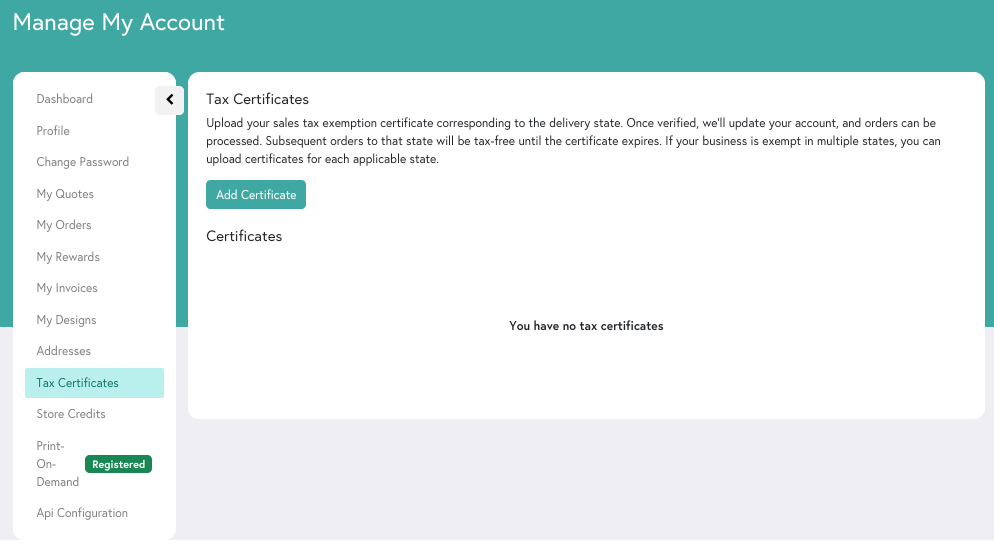
- Go to ‘My Account’
- Click the ‘Tax Certificates’ tab
- Click the ‘Add Certificate’ button.
- Fill in the form and upload a high-quality image file of your sales tax exemption certificate corresponding to the delivery state. Accepted formats include JPG, PNG, and PDF.
- Allow 5-7 business days for review and approval. You will receive a notification once your certificate is approved.
For any issues with print quality, damages, or missing orders, please email care@mixam.com. Include your order number, a brief description of the issue, and photos if applicable. Customers must report lost orders, delays, or damages within 5 days of the expected delivery date. Quality or quantity issues must be reported within 10 days of delivery.
For technical, payment, or publication availability issues, customers can contact our team via chat, phone, or email. We recommend informing customers in advance that you have no returns policy, as all products are made to order. If a customer receives a damaged order or the wrong item, refunds or replacements can be arranged with Mixam’s Care Team via care@mixam.com.
Eligible refunds are processed within 3–7 business days. If a customer reports damage or a misprint and doesn’t want a replacement copy, a publisher’s commission payout will be deducted from their account within the first two weeks of the new month. The total commissions will reflect total sales minus any refunds.
For order replacements, customers can email us with their order number, email address, and phone number. Response times may be longer during busy periods or for complex cases.
Now that you have an overview of how your customers experience PrintLink, you can explore how to widen your sales and start Selling Prducts with Shopify.